Implementation & Migration

From VMware to Sovereign
Proxmox - Delivered.

A staged, low-risk migration run by our own engineers: assessment, proof of concept, pilot, full cutover and 24/7 managed operations. Zero business disruption, documented rollback, 4-hour on-site SLA.

VMware Exodus Path

A Low-Risk Migration Roadmap

We migrate production workloads without business disruption - assessment first, then a staged cutover.

Stage 01

VMware Estate Assessment & TCO Audit

We inventory every ESXi host, VM, datastore, and dependency, then model the true 3-year Broadcom licensing cost against a Proxmox HCI target design. Output: a costed, right-sized blueprint.

Deliverables

  • ✓ Complete VM & host inventory report
  • ✓ 3-year VMware vs Proxmox TCO model
  • ✓ Right-sized hardware BOM
  • ✓ Migration risk register
Stage 02

Isolated Proof-of-Concept Sandbox

We stand up a Proxmox HCI cluster in isolation and migrate representative workloads - including a simulated node failure - so your team can validate performance and HA behaviour before touching production.

Deliverables

  • ✓ Turnkey PoC cluster (3-node HA)
  • ✓ Representative workload migration
  • ✓ Benchmark & failover test report
  • ✓ Sign-off criteria definition
Stage 03

Pilot Migration (Non-Critical Tier)

Live VM conversion of a non-critical application tier with real users, using automated tooling and rollback checkpoints at every step. This de-risks the process on real workloads.

Deliverables

  • ✓ Staged batch migration log
  • ✓ Validation checklist per workload
  • ✓ Rollback runbook
  • ✓ Application sign-off (pilot tier)
Stage 04

Full Cutover & Ceph Rebalance

Scheduled migration of the remaining production estate, ending with decommissioning of the legacy VMware footprint and a tuned, verified Ceph cluster.

Deliverables

  • ✓ Full production cutover
  • ✓ Ceph tuning & rebalance verification
  • ✓ Post-migration integrity testing
  • ✓ Legacy VMware decommission
Stage 05

24/7 Managed NOC & 4-Hour Onsite SLA

Continuous health telemetry, security patching, and SLA-backed on-site parts dispatch from our Bangi operations centre, backed by Support Desk workflows.

Deliverables

  • ✓ 24/7 enterprise helpdesk
  • ✓ 4-hour on-site hardware SLA
  • ✓ Continuous telemetry (PRTG/Grafana)
  • ✓ In-house staff enablement
Live High-Availability Architecture

Self-Healing Proxmox HCI in Action

Experience how our 3-node HA cluster survives catastrophic hardware failure with zero storage downtime and automated VM failover.

Quorum: 3/3 (Full Quorum) Ceph: HEALTH_OK (3x Replicated)
pve-node-01 (Primary)
ONLINE
Active Workloads:10 VMs
Ceph OSD Storage:4x 3.84TB NVMe
Corosync Quorum:Vote: 1 (OK)
Interconnect:Dual 25GbE RoCE
pve-node-02
ONLINE (Healthy)
Active Workloads:8 VMs
Ceph OSD Storage:4x 3.84TB NVMe
Corosync Quorum:Vote: 1 (OK)
Interconnect:Dual 25GbE RoCE
pve-node-03
ONLINE
Active Workloads:9 VMs
Ceph OSD Storage:4x 3.84TB NVMe
Corosync Quorum:Vote: 1 (OK)
Interconnect:Dual 25GbE RoCE
[INIT] Proxmox VE Cluster "tp-cluster-bangi" online. 3 nodes, 27 VMs running.
[CEPH] Ceph storage pool healthy. CRUSH map ruleset active, 3x replica factor.
[COROSYNC] Quorum achieved. Cluster ready for live workloads.
Reference Deployment

Proven Performance & Business Value

Before/after results from a legacy Hyper-V + SAN estate rebuilt on Proxmox HCI - the same uplift pattern we apply to VMware estates in the roadmap above.
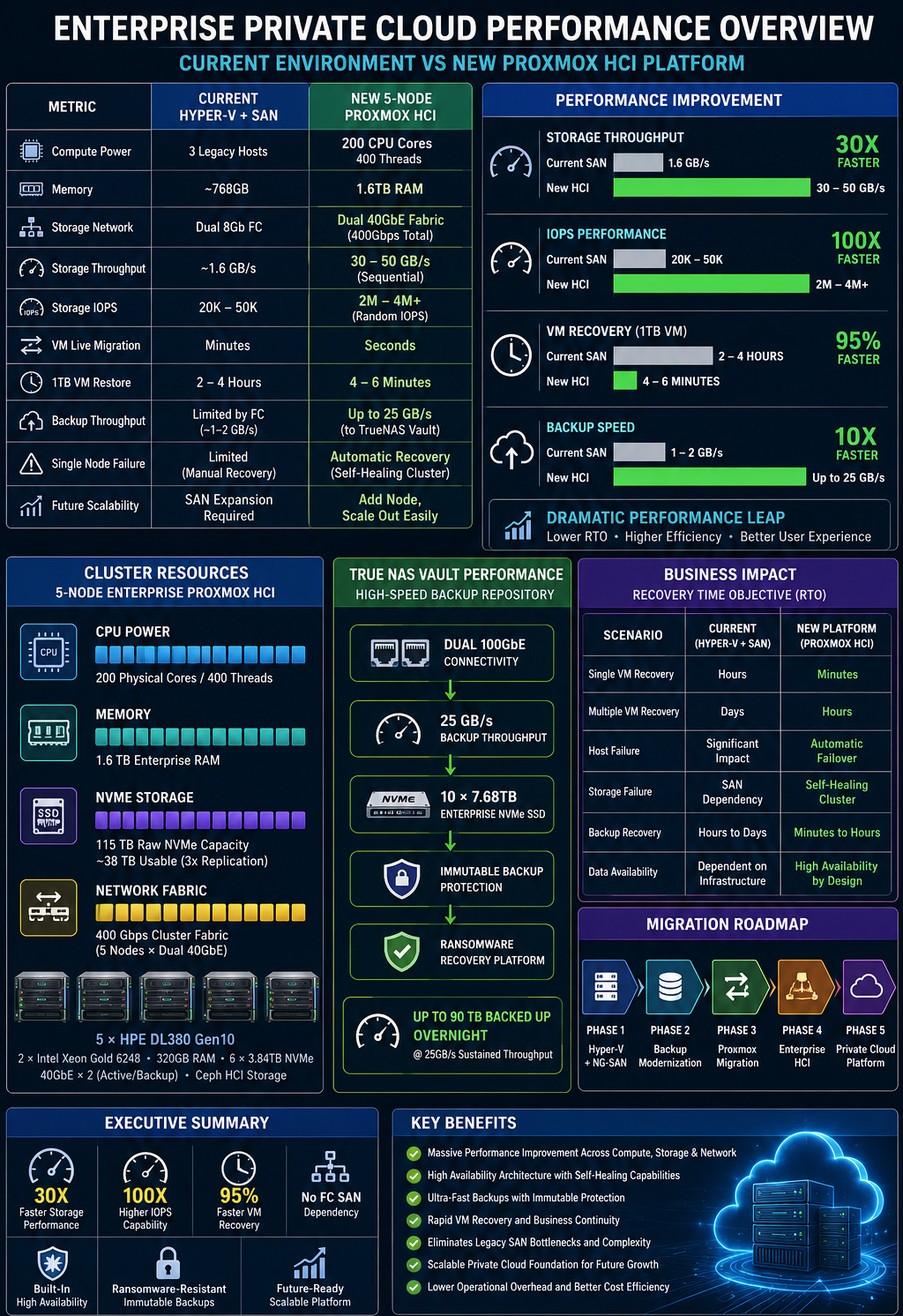
Enterprise private cloud performance overview comparing the legacy environment with the new Proxmox HCI platform - 30x faster storage, 100x higher IOPS, 95% faster VM recovery, no Fibre Channel SAN, built-in high availability, immutable backups and lower operational overhead.
Enterprise private cloud performance overview - the legacy Hyper-V + SAN estate (before) vs the delivered Proxmox HCI platform (after). Click to view full size ↗
Architecture Studio

Configure Your Proxmox HCI Blueprint

Customize your node count, storage tier, and network fabric. Watch your technical specs update in real time.

1. Cluster Compute Scale
2. Storage Architecture
3. Networking Fabric
4. Enterprise Engineering SLA
Generated Specification

Tuah Packet HCI Blueprint

Compute Nodes:3x Enterprise Proxmox Nodes
Processor / RAM:96 vCPUs / 768 GB ECC DDR5
Ceph Storage Pool:46 TB Raw (15 TB Usable Ceph)
Storage Performance:180,000 IOPS
Network Interconnect:Dual 25GbE RoCE Mesh
Fault Tolerance:1 Node / 4 OSDs Safe
Support Agreement:24/7/365 On-site (4-Hour SLA)
Delivery Model

How We Deliver & Keep It Running

Every cutover runs to a written runbook with rollback checkpoints, then hands over to 24/7 managed operations.

Cutover Windows

Scheduled, Zero-Downtime Moves

Migrations run in agreed change windows with live VM conversion and per-workload validation, so production keeps serving traffic.

Safety

Rollback Checkpoints

Every stage has a tested rollback path and a pre-migration backup, so no workload is ever a one-way door.

Operations

24/7 Managed NOC & 4-Hour SLA

Continuous telemetry, patch management and on-site hardware response from our Bangi operations centre, backed by Support Desk.

Enablement

Handover & Team Training

Documentation, runbooks and hands-on enablement so your own team can operate the cluster with confidence.

Ready to Migrate off VMware?

Run the live failover demo, then book a migration assessment - or review the architecture first.

Back to Architecture Book HCI Assessment